
If you sell on Amazon, you’ve seen them.
Those big orange bars inside Seller Central.
They go up. They look impressive.
And they make you feel like your business is doing well.
But what if I told you those orange bars are actually lying to you?

Not on purpose. Amazon isn’t trying to trick you.
But those bars are not telling you the full story.
Because sales are not profit.
And the reality is this: most Amazon sellers, even experienced ones, think they’re making way more money than they actually are.
In this post, I want to break down exactly why that happens, how I discovered it in my own business and the one tool that completely changed how I see my numbers.
If you are serious about selling on Amazon long term, this is something you need to understand.
Who I Am and Why You Should Listen
If you’re new here, what’s going on everybody.
My name is Steve Raiken and I’ve been selling on Amazon for over 10 years.
In just the last two years alone, I’ve sold over 14,000 products flipping items from eBay to Amazon.
That comes out to roughly $1.5 million in sales.
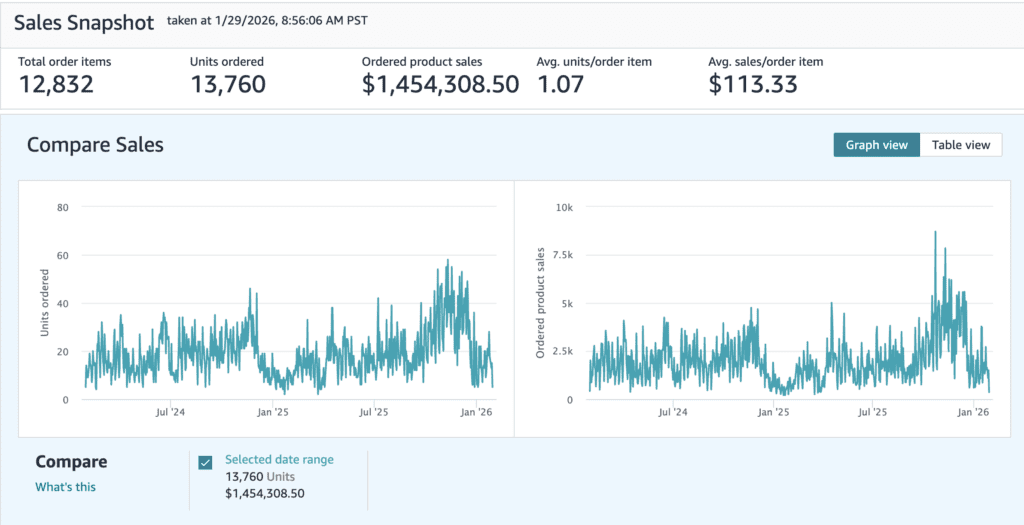
But here’s the part that actually matters.
Sales don’t mean anything if you don’t know your real net profit.
And for years, like a lot of sellers, I was relying too heavily on surface-level numbers inside Amazon Seller Central.
I knew my business was working. I knew money was coming in. But I didn’t have full visibility.
That changed about 13 months ago when I started using a specific software that completely changed how I look at my Amazon business.
That software is called Sellerboard.
And in this post, I’m going to show you exactly how it works, why it matters and how it helped me generate over six figures in real net profit.
The Big Mistake Most Amazon Sellers Make
Amazon Seller Central is great at showing you revenue.
It is not great at showing you profit.
Those orange bars you see inside Seller Central only show product sales.
They do not show:
• Net profit
• True margins
• Refund impact
• Indirect expenses
• Cost of goods accuracy
• ROI by ASIN
So sellers end up making decisions based on incomplete data.
I’ve talked to dozens of sellers over the last year who thought they were crushing it, only to find out they were barely breaking even or losing money on certain products.
And here’s the dangerous part.
When you don’t know your real numbers, you keep reinvesting into the wrong products.
You double down on items that look good on the surface but are actually killing your margins.
That’s exactly why knowing your real net profit changes everything
The Software That Changed Everything for Me
The software I’m talking about is Sellerboard.
Before we get into how I use it, there are a few important things you should know upfront.
First, Sellerboard offers a free two month trial through my link. No credit card required.
Second, getting started is extremely simple.
After you sign up, you integrate your Amazon seller account.
The actual connection takes about 60 seconds, but depending on the size of your account, it can take up to 24 hours for Sellerboard to fully pull in all your data.
That’s because it’s pulling in a massive amount of information.
Once that’s done, there are two things you must set up correctly if you want accurate numbers.
Step One: Update Your Cost of Goods
This part matters more than most sellers realize.
If your cost of goods are missing or outdated, your profit numbers are useless.
Since we just kicked off a new year, I recommend starting fresh from January 1st.
Going back years can feel overwhelming, and honestly, it’s not necessary.
You have two options here.
You can manually update cost of goods one by one, which is what my team did because we store buy costs in our custom SKUs.
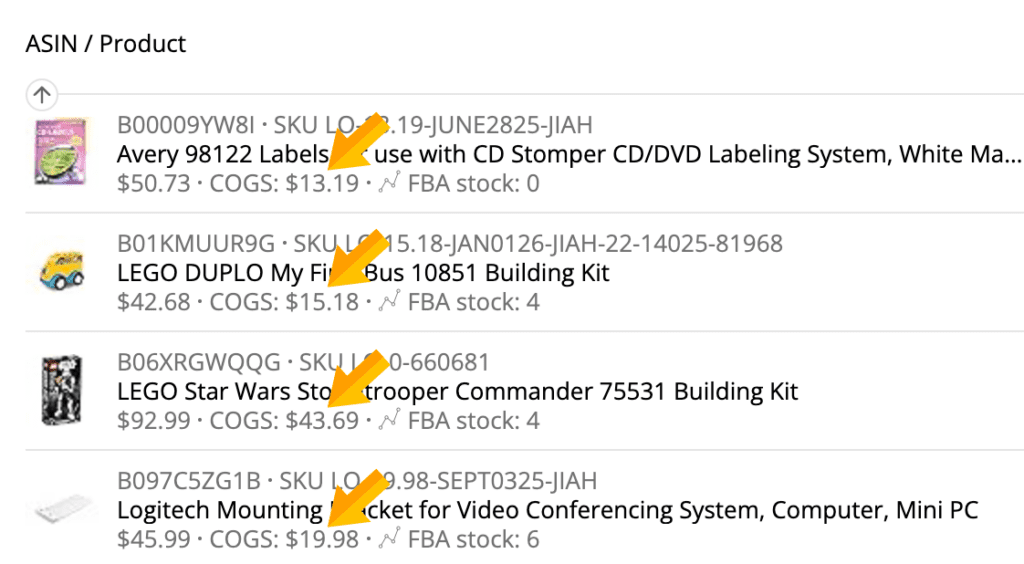
Or, if you are more tech savvy, you can bulk upload your cost of goods into Sellerboard.
Either way, this step is non negotiable.
No accurate costs means no accurate profit.
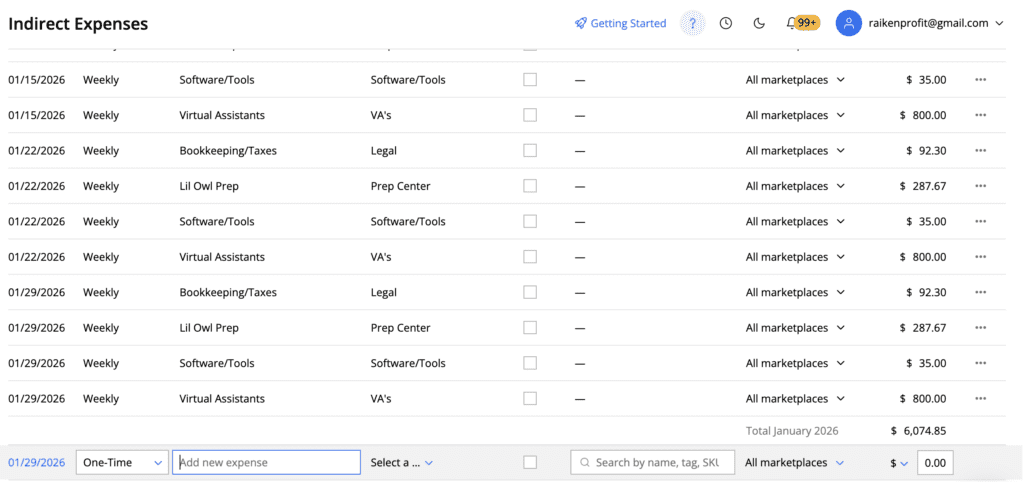
Step Two: Add Your Indirect Expenses
This is where most sellers completely miss the mark.
Amazon does not track everything.
Sellerboard allows you to input indirect expenses such as:
• Prep center fees
• Virtual assistant wages
• Software subscriptions
• Supplies and tools
• Bookkeeping and CPA costs
The goal is simple.
You want Sellerboard to know every expense that impacts your business outside of Amazon.
Once you do this, Sellerboard handles the rest automatically.
Amazon fees, refunds, storage, fulfillment, everything is pulled directly from your account.
Now you are finally looking at real numbers.
The Sellerboard Dashboard: Real Visibility
Once everything is set up, the first place you’ll land is the main dashboard.
This is where things start to get eye opening.
You can choose preset time frames like month to date, last month, or past months.
You can also set custom date ranges.
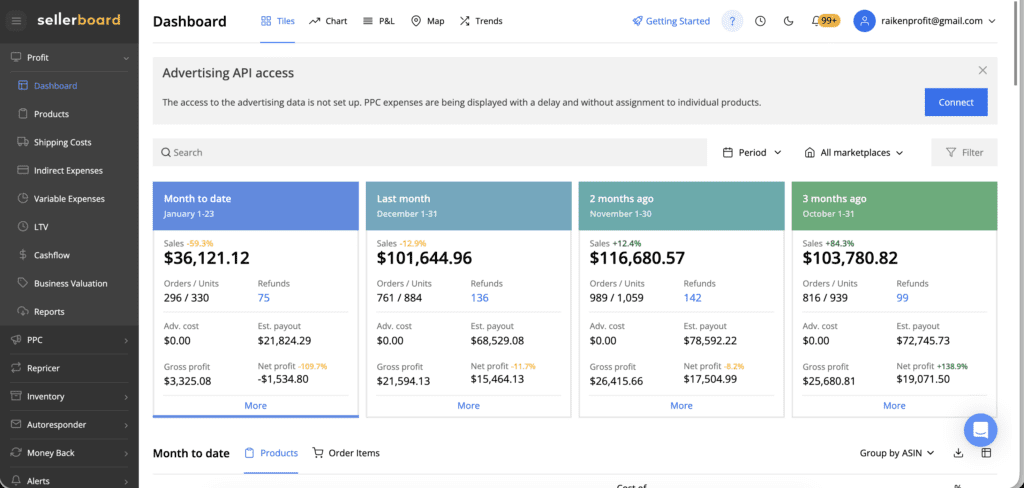
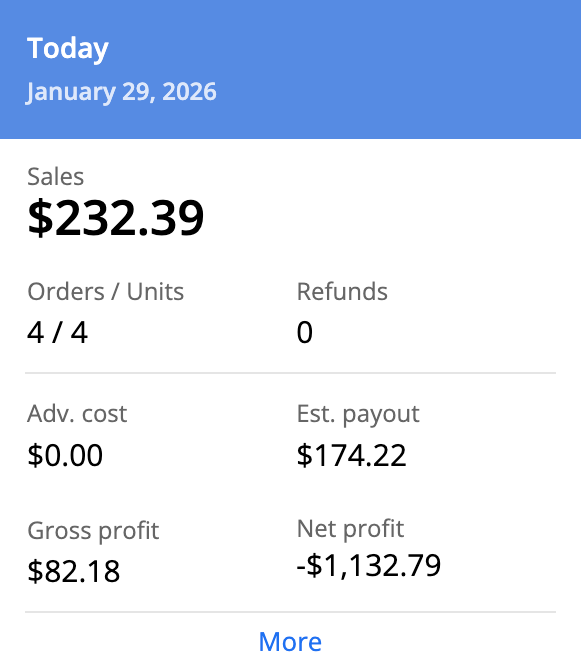
For example, month to date, I might see something like $36,000 in sales.
Sounds great, right?
But then I look at net profit and realize I actually lost money.
In January I was down over $1,000 despite strong sales.
Why?
Returns.
January is known as Returnuary for a reason. Returns from Q4 hit hard.
Sellerboard doesn’t sugarcoat this. It shows you exactly what is happening.
And that level of honesty is what allows you to make better decisions.
Breaking Down the Numbers (The Stuff Amazon Hides)
When you click into the detailed breakdown, this is where Sellerboard really shines.
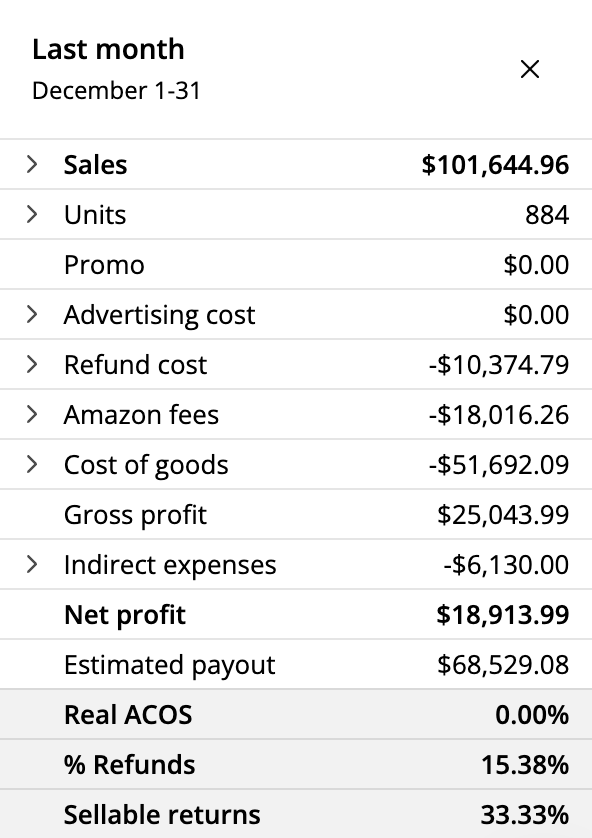
You can see:
• Refund costs
• Amazon referral fees
• FBA fulfillment fees
• Storage fees
• Subscription fees
• Lost and damaged inventory
• Replacement and reimbursement data
Trying to pull all of this manually inside Seller Central would take hours.
Sellerboard does it instantly.
You can also see your indirect expenses broken down clearly.
Virtual assistants. Prep centers. Accounting. Software.
And of course, your cost of goods.
Everything in one place.
This is real profit tracking.
Proving the Six Figures in Net Profit
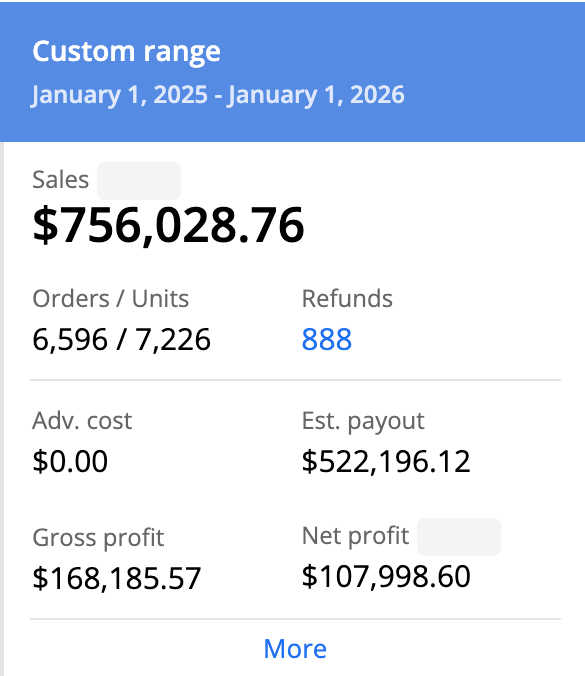
I said earlier that Sellerboard helped me generate over six figures in net profit and I want to show you that.
By setting a custom date range from January 1st to January 1st of the following year, Sellerboard showed:
• $756,000 in sales
• Over 7,000 units sold
• 888 refunds
• $108,000 in net profit
And that number is actually conservative.
It does not include:
• Cash back from my credit cards
• Cash back from eBay portals like TopCashBack and BeFrugal
• Money recovered from reselling returns
When you factor those in, my real net profit was over $130,000.
Without Sellerboard, I would not have had the confidence to spend over $376,000 sourcing inventory on eBay.
Profit by ASIN: The Real Game Changer
This is the feature that truly changed my business.
Sellerboard allows you to track profitability by ASIN.
This is huge.
Because you might be selling the same product 10, 15, 20 times without realizing you’re barely making money or even losing money.
I discovered ASINs I had sold repeatedly that looked good on the surface but were not worth the effort.
High refunds. Price drops. Thin margins.
Sellerboard exposed all of it.
How I Use Sellerboard With Replen Catcher
I buy all my inventory on eBay.
I use a software called Replen Catcher to find undervalued deals that I flip on Amazon.
Sellerboard is integrated directly into that workflow.
Inside Replen Catcher, I can click a button to analyze an ASIN inside Sellerboard.
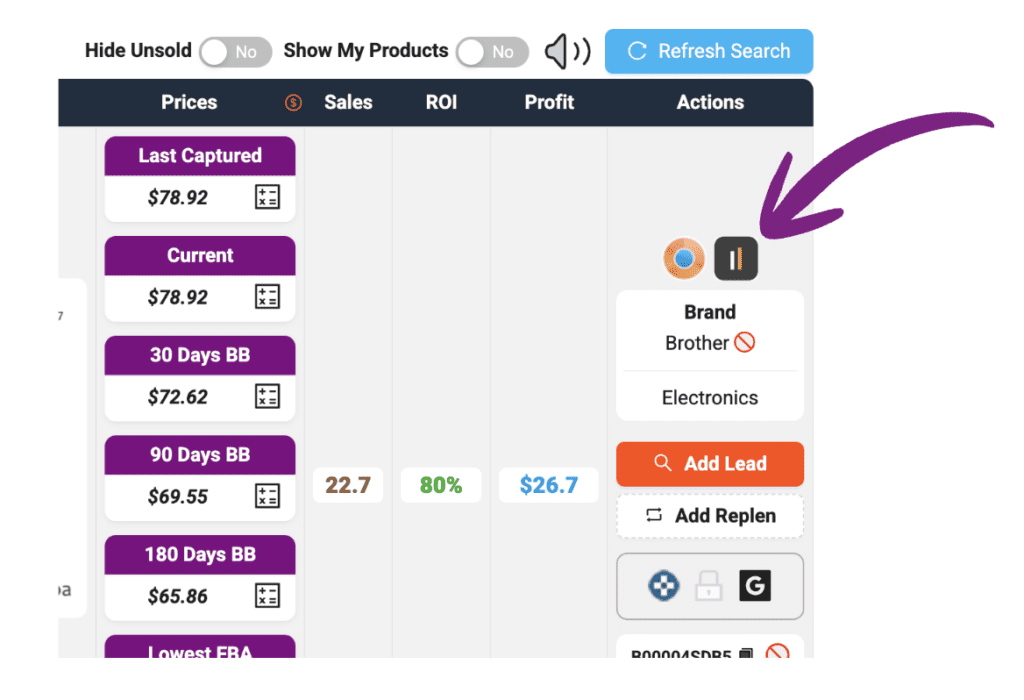
Within seconds, I see:
• Total sales
• Refund rate
• Cost of goods
• Amazon fees
• Net profit
• Net margin
• ROI
This allows me to make fast, confident decisions.
Example #1 : A Clear Winner
One board game I sold three times generated:
• $196 in sales
• $74 in cost of goods
• $71.85 in net profit
• 36% net margin
• 96% ROI
Zero refunds.
That is a no brainer. I keep buying it.
Example #2: Still Profitable, Still Worth It
Another product sold 11 times with two refunds.
Despite an 18% refund rate, it still generated:
• $143 in net profit
• 23% net margin
• 50% ROI
Still worth selling.
This level of clarity is priceless.
Example #3: Not Worth the Squeeze
Then there are products that technically make money but aren’t worth continuing.
One CD DVD set sold 11 times, had two refunds, and only generated $91 in profit.
Net margin was under 20%.
We tagged it as do not buy.
Without Sellerboard, we probably would have kept sourcing it.
Why Knowing Your Numbers Changes Everything

When you truly know your numbers, everything changes.
You reinvest with confidence.
You scale the right products.
You cut losers quickly.
You stop guessing.
You stop trusting the orange bars.
Sellerboard gives you visibility.
And visibility leads to better decisions.
Final Thoughts
If you are serious about selling on Amazon, whether you are brand new or have been selling for years, you must know your numbers.
Sales are not profit.

Orange bars do not tell the full story.
Sellerboard gives you the clarity Amazon does not.
If you want to try it, you can get a free two month trial with no credit card required using this link:

GET YOUR 60 DAY TRIAL OF SELLERBOARD HERE
Once you see your real numbers, you will never look at your business the same way again.
And that is a good thing.
Hope you enjoyed and thanks for reading.
Steve

Hey, I’m Steve
I'm just an average guy who reached a point in life where I grew weary of the corporate grind and decided to forge my own path.

Welcome to my website where I share my journey as an entrepreneur and offer support to those who aspire to start their own businesses and transform their lives, just like I did.
I understand the challenges and frustrations that come with breaking away from the traditional nine-to-five routine. That's why I created this platform – to provide inspiration, guidance, and practical tips to help you navigate the exciting world of entrepreneurship.







360 Bloomfield Ave, Suite 301,
Windsor, CT, 06095, United States
© Copyright 2026 | All Rights Reserved